
Implementing Two-Factor Authentication (2FA) with TOTP in a Remix app
Introduction
I've always wondered how 2FA actually worked.You open Google Authenticator, scan a QR code, and suddenly the app starts generating a 6-digit code that keeps changing every few seconds; it felt like magic. From the user's side, the whole thing feels simple. From the app side, though, I wanted to understand the moving pieces properly.
So I decided to build a small demo app, totp-demo to see the whole flow end-to-end: login with email and password, turn on 2FA from settings, scan a QR code, verify the first code, and then enforce that TOTP step on the next login.
Hopefully, by the end, if we don't get lost, we'd have a working 2FA system!
We'll keep the auth system super simple, back it with SQLite, and wire the up TOTP flow.
Getting started
I'm using the current React Router / Remix tooling here, so the project starts with create-react-router:
npx create-react-router@latest totp-demo
cd totp-demo
I use Remix on a daily, so the route/action flow feels very familiar, but using the latest version to see what's new as well.
I also used this as an excuse to finally try Jujutsu. I've heard enough good things about it for a while now, so I figured I might as well let this demo be the project where I stop procrastinating.
I'm on a Mac, so I installed it with:
brew install jjThen initialized the repo:
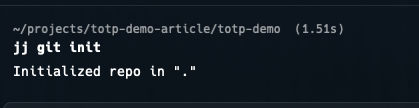
jj git initThat gave me the first clean snapshot of the project:
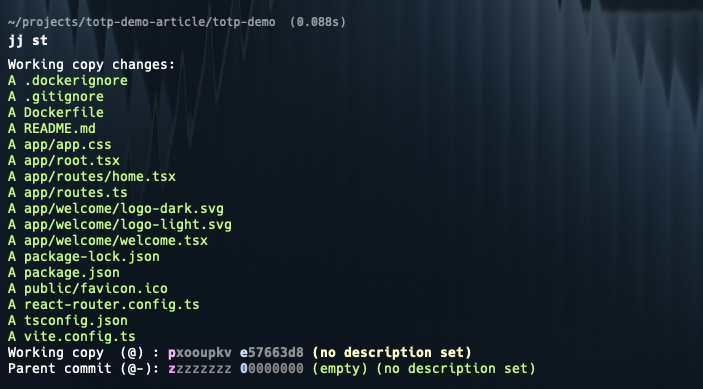
And jj st gives the status view of the working tree:
Before the first describe, I configured identity:
jj config set --user user.name "Edwards Moses"
jj config set --user user.email "edwardsmoses3@gmail.com"
And then:
jj describe -m "chore: start of totp demo"
Installing the packages
For this demo, I wanted the smallest set of dependencies: .
speakeasyhandles the TOTP secret generation and token verification.qrcodeturns theotpauth://URL into an image that an authenticator app can scan.better-sqlite3gives us a simple local database without introducing an ORM.bcryptjslets us hash the demo password instead of storing it in plain text.
To install them:
npm install speakeasy qrcode better-sqlite3 bcryptjsWe also need a session secret for the cookie session storage. I added this to a .env file at the project root:
SESSION_SECRET=super-secret-but-not-for-productionSetting up the demo database
Since I wanted this rooted in an 'actual' project, I didn't want to wave the data layer away with "assume auth already exists".
I'm keeping the demo database intentionally small. We only need a single users table with the normal login bits and the two fields that matter for 2FA:
two_factor_temp_secretwhile the user is in setuptwo_factor_secretonce setup is verified and permanent
Create app/utils/db.server.ts:
import Database from "better-sqlite3";
import { hashSync } from "bcryptjs";

type User = {
  id: number;
  email: string;
  password_hash: string;
  two_factor_enabled: boolean;
  two_factor_secret?: string;
  two_factor_temp_secret?: string;
}

const db = new Database("totp-demo.sqlite");

db.exec(`
  CREATE TABLE IF NOT EXISTS users (
    id INTEGER PRIMARY KEY AUTOINCREMENT,
    email TEXT NOT NULL UNIQUE,
    password_hash TEXT NOT NULL,
    two_factor_enabled INTEGER NOT NULL DEFAULT 0,
    two_factor_secret TEXT,
    two_factor_temp_secret TEXT
  )
`);

const existingUser = db
  .prepare("SELECT id FROM users WHERE email = ?")
  .get("demo@example.com");

if (!existingUser) {
  db.prepare(
    `
      INSERT INTO users (
        email,
        password_hash,
        two_factor_enabled
      ) VALUES (?, ?, 0)
    `
  ).run("demo@example.com", hashSync("password123", 10));
}

export function findUserByEmail(email: string): User | undefined {
  return db.prepare("SELECT * FROM users WHERE email = ?").get(email) as User | undefined;
}

export function findUserById(id: number): User | undefined {
  return db.prepare("SELECT * FROM users WHERE id = ?").get(id) as User | undefined;
}

export function setTemporaryTwoFactorSecret(userId: number, secret: string) {
  db.prepare(
    `
      UPDATE users
      SET two_factor_temp_secret = ?
      WHERE id = ?
    `
  ).run(secret, userId);
}

export function enableTwoFactor(userId: number) {
  db.prepare(
    `
      UPDATE users
      SET
        two_factor_enabled = 1,
        two_factor_secret = two_factor_temp_secret,
        two_factor_temp_secret = NULL
      WHERE id = ?
    `
  ).run(userId);
}

export function clearTwoFactor(userId: number) {
  db.prepare(
    `
      UPDATE users
      SET
        two_factor_enabled = 0,
        two_factor_secret = NULL,
        two_factor_temp_secret = NULL
      WHERE id = ?
    `
  ).run(userId);
}
If you wanna get rid of the red-lines, you can install the types:
npm i --save-dev @types/better-sqlite3For the demo, I'm seeding a single user directly from the DB helper, so I don't have to build registration too. That gives us a stable account to test against:
- email:
demo@example.com - password:
password123
At this point, the app shape I cared about looked like this:
app/
  routes/
    login.tsx
    settings.2fa.tsx
    verify-2fa.tsx
  utils/
    db.server.ts
    session.server.ts
Session helpers
We need two session states in this app:
- a fully authenticated session with
userId - a temporary "halfway through auth" session with
pending2faUserId
That second state is the important part. After the password is correct, we still don't want to treat the user as fully signed in until the TOTP code checks out.
Create app/utils/session.server.ts:
import { createCookieSessionStorage, redirect } from "react-router";

const sessionStorage = createCookieSessionStorage({
  cookie: {
    name: "__session",
    httpOnly: true,
    sameSite: "lax",
    path: "/",
    secure: false,
    secrets: [process.env.SESSION_SECRET || ""],
  },
});

export async function getSession(cookieHeader: string | null) {
  return sessionStorage.getSession(cookieHeader);
}

export async function commitSession(session: any) {
  return sessionStorage.commitSession(session);
}

export async function destroySession(session: any) {
  return sessionStorage.destroySession(session);
}

export async function requireUserId(request: Request) {
  const session = await getSession(request.headers.get("Cookie"));
  const userId = session.get("userId");

  if (!userId) {
    throw redirect("/login");
  }

  return userId;
}
I'm using the same cookie for both states; the only thing that changes is which key is present in the session.
Building the login route
We making some progress, nothing visible yet, let's move to the actual auth flow.
The login route checks the email and password. If the user doesn't have 2FA turned on, we set userId in session and redirect home. If they do have 2FA enabled, we set pending2faUserId instead and redirect to /verify-2fa.
Create app/routes/login.tsx:
import { compareSync } from "bcryptjs";
import { Form, redirect, useActionData, useNavigation } from "react-router";
import { findUserByEmail } from "~/utils/db.server";
import { getSession, commitSession } from "~/utils/session.server";

export async function action({ request }: { request: Request }) {
  const formData = await request.formData();
  const email = formData.get("email")?.toString().trim() || "";
  const password = formData.get("password")?.toString() || "";

  const user = findUserByEmail(email);

  if (!user || !compareSync(password, user.password_hash)) {
    return { error: "Invalid email or password." };
  }

  const session = await getSession(request.headers.get("Cookie"));

  if (user.two_factor_enabled) {
    session.set("pending2faUserId", user.id);

    return redirect("/verify-2fa", {
      headers: {
        "Set-Cookie": await commitSession(session),
      },
    });
  }

  session.set("userId", user.id);

  return redirect("/", {
    headers: {
      "Set-Cookie": await commitSession(session),
    },
  });
}

export default function Login() {
  const actionData = useActionData();
  const navigation = useNavigation();

  return (
    <div>
      <h1>Login</h1>

      <Form method="post">
        <input type="email" name="email" placeholder="demo@example.com" required />
        <input
          type="password"
          name="password"
          placeholder="password123"
          required
        />
        <button type="submit">
          {navigation.state === "submitting" ? "Signing in..." : "Sign in"}
        </button>
      </Form>

      {actionData?.error ? <p>{actionData.error}</p> : null}
    </div>
  );
}
I like this split because the password step stays boring. The only extra branch is whether we stop there or send the user to the second factor page.
So, the below bit was something new, I'm used to the previous filesystem always routing for Remix, but in the new React Router flow, that needs to be explicitly configured.
First, we want to install:
npm i @react-router/fs-routesThen, we want to replace app/routes.ts with:
import { type RouteConfig, index } from "@react-router/dev/routes";
import { flatRoutes } from "@react-router/fs-routes";

export default [...(await flatRoutes())] satisfies RouteConfig;
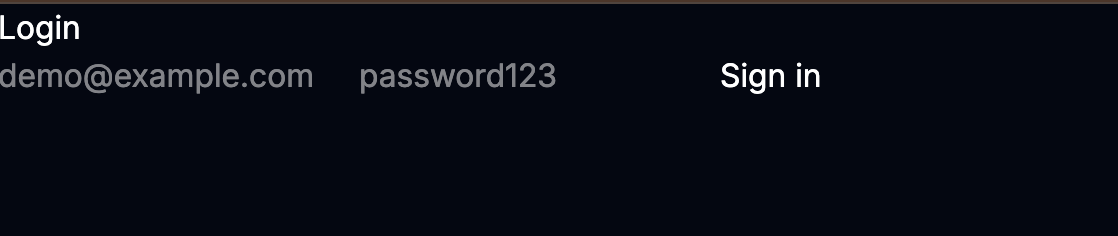
I'm definitely not winning any design awards for this login page:
Generating the QR code and turning on 2FA
Once the user is logged in, we can give them a page to enable 2FA.
The first job on /settings/2fa is to generate a new secret and store it in two_factor_temp_secret. I only move it into two_factor_secret after the user proves the setup worked by entering a valid code from their authenticator app.
Create app/routes/settings.2fa.tsx:
import QRCode from "qrcode";
import speakeasy from "speakeasy";
import { Form, useActionData, useLoaderData } from "react-router";
import {
  findUserById,
  setTemporaryTwoFactorSecret,
  enableTwoFactor,
} from "~/utils/db.server";
import { requireUserId } from "~/utils/session.server";

async function qrCodeForSecret(userEmail: string, secret: string) {
  const otpAuthUrl = speakeasy.otpauthURL({
    secret,
    label: `totp-demo:${userEmail}`,
    issuer: "totp-demo",
    encoding: "base32",
  });

  return QRCode.toDataURL(otpAuthUrl);
}

export async function loader({ request }: { request: Request }) {
  const userId = await requireUserId(request);
  const user = findUserById(userId);

  if (!user) {
    throw new Response("User not found", { status: 404 });
  }

  return {
    twoFactorEnabled: Boolean(user.two_factor_enabled),
  };
}

export async function action({ request }: { request: Request }) {
  const userId = await requireUserId(request);
  const user = findUserById(userId);
  const formData = await request.formData();
  const intent = formData.get("intent");

  if (!user) {
    throw new Response("User not found", { status: 404 });
  }

  if (intent === "generate") {
    const secret = speakeasy.generateSecret({
      name: user.email,
      issuer: "totp-demo",
    });

    setTemporaryTwoFactorSecret(userId, secret.base32);

    return {
      qrCodeDataUrl: await QRCode.toDataURL(secret.otpauth_url || ""),
      success: false,
    };
  }

  if (intent === "verify") {
    const token = formData.get("token")?.toString() || "";

    if (!user.two_factor_temp_secret) {
      return { error: "Start setup again so we can generate a new secret." };
    }

    const verified = speakeasy.totp.verify({
      secret: user.two_factor_temp_secret,
      encoding: "base32",
      token,
      window: 1,
    });

    if (!verified) {
      return {
        error:
          "That code didn't match. Try the current code from your authenticator app.",
        qrCodeDataUrl: await qrCodeForSecret(
          user.email,
          user.two_factor_temp_secret,
        ),
      };
    }

    enableTwoFactor(userId);

    return {
      success: true,
    };
  }

  return { error: "Unknown action." };
}

export default function TwoFactorSettings() {
  const actionData = useActionData();
  const loaderData = useLoaderData();

  return (
    <div>
      <h1>Two-Factor Authentication</h1>

      {loaderData.twoFactorEnabled ? (
        <p>2FA is already enabled on this account.</p>
      ) : null}

      {!actionData?.qrCodeDataUrl && !actionData?.success ? (
        <Form method="post">
          <input type="hidden" name="intent" value="generate" />
          <button type="submit">Generate QR code</button>
        </Form>
      ) : null}

      {actionData?.qrCodeDataUrl ? (
        <div>
          <p>
            Scan this with Google Authenticator, Microsoft Authenticator, or
            Authy.
          </p>
          <img src={actionData.qrCodeDataUrl} alt="TOTP QR code" />

          <Form method="post">
            <input type="hidden" name="intent" value="verify" />
            <input
              type="text"
              name="token"
              placeholder="123456"
              maxLength={6}
              required
            />
            <button type="submit">Verify and enable 2FA</button>
          </Form>
        </div>
      ) : null}

      {actionData?.error ? <p>{actionData.error}</p> : null}
      {actionData?.success ? <p>2FA is now enabled for this account.</p> : null}
    </div>
  );
}
A couple of useful things are happening here:
speakeasy.generateSecret()creates the shared secretQRCode.toDataURL()turns theotpauth://URL into an image- the first valid token is what graduates the secret from temporary to permanent
window: 1gives a small amount of time drift tolerance, which makes testing less annoying
That temporary secret field is doing a real job for us. If the user abandons setup halfway through, we haven't fully enabled 2FA yet, and we haven't accidentally made the account harder to access.
If you haven't already, let's also install the types for the packages we're using in this route:
npm i --save-dev @types/qrcode
npm i --save-dev @types/speakeasy
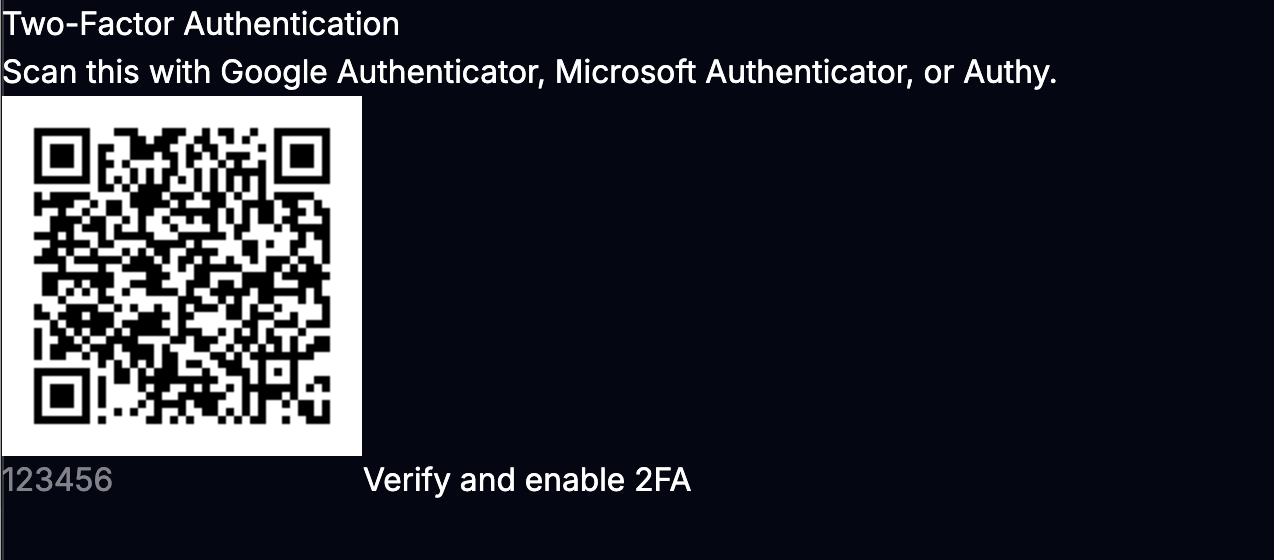
Okay, now we have the QR code displayed, yay progress!!
Verifying the TOTP code during login
Now for the enforcing part.
When a user with 2FA enabled logs in, we redirect them to /verify-2fa. On this route, we read pending2faUserId from session, look up the stored secret, and verify the submitted token.
If the token is correct, we promote the session from "pending 2FA" to "fully logged in".
Create app/routes/verify-2fa.tsx:
import speakeasy from "speakeasy";
import { Form, redirect, useActionData, useNavigation } from "react-router";
import { findUserById } from "~/utils/db.server";
import { getSession, commitSession } from "~/utils/session.server";

export async function loader({ request }: { request: Request }) {
  const session = await getSession(request.headers.get("Cookie"));

  if (!session.get("pending2faUserId")) {
    throw redirect("/login");
  }

  return null;
}

export async function action({ request }: { request: Request }) {
  const session = await getSession(request.headers.get("Cookie"));
  const pendingUserId = session.get("pending2faUserId");
  const token = (await request.formData()).get("token")?.toString() || "";

  if (!pendingUserId) {
    throw redirect("/login");
  }

  const user = findUserById(pendingUserId);

  if (!user || !user.two_factor_secret) {
    return { error: "This account doesn't have 2FA enabled." };
  }

  const verified = speakeasy.totp.verify({
    secret: user.two_factor_secret,
    encoding: "base32",
    token,
    window: 1,
  });

  if (!verified) {
    return { error: "Invalid code. Try the latest code from your authenticator app." };
  }

  session.unset("pending2faUserId");
  session.set("userId", user.id);

  return redirect("/", {
    headers: {
      "Set-Cookie": await commitSession(session),
    },
  });
}

export default function VerifyTwoFactor() {
  const actionData = useActionData();
  const navigation = useNavigation();

  return (
    <div>
      <h1>Verify 2FA</h1>
      <p>Enter the 6-digit code from your authenticator app.</p>

      <Form method="post">
        <input
          type="text"
          name="token"
          placeholder="123456"
          maxLength={6}
          required
        />
        <button type="submit">
          {navigation.state === "submitting" ? "Checking..." : "Verify code"}
        </button>
      </Form>

      {actionData?.error ? <p>{actionData.error}</p> : null}
    </div>
  );
}
And, we have a winner on our hands! With this, the loop is completed.
At this point, the app behaves the way I wanted from the start:
- password-only login for accounts without 2FA
- password + TOTP for accounts with 2FA enabled
- setup only becomes permanent after the first successful verification
A quick note
For this demo, I'm storing the TOTP secret directly in SQLite so the flow is easy to follow.
In a real application, I'd treat that secret much more carefully:
- encrypt it at rest
- make sure disable / reset flows are deliberate
- add backup codes so users don't get stranded when they lose a device
I'm intentionally leaving recovery codes and more complex logic / edge-cases out of this walkthrough so the core TOTP flow stays easy to follow.
Testing the flow
Once everything was wired up, I ran through the whole thing with the seeded user.
The test path is pretty simple:
- Sign in with
demo@example.comandpassword123. - Visit
/settings/2faand generate a QR code. - Scan the QR code with an authenticator app.
- Enter the current 6-digit token to finish setup.
- Sign out and log back in.
- Confirm the app now pauses at
/verify-2fabefore finishing login.
A few useful failure cases to test too:
- enter the wrong code during setup and make sure 2FA does not turn on
- enter the wrong code on
/verify-2faand make sure the session stays pending - wait for the code to rotate and verify the next one still works
- clear the 2FA columns in SQLite and confirm the account falls back to password-only login
If you can get through those cases cleanly, the implementation is in a pretty solid place.
Wrapping up
This was a really fun one.
TOTP feels a lot less magical once I got hands-on. At the end of the day, the flow is just:
- generate a shared secret
- let the user scan it
- verify one code to confirm setup
- ask for the code again on future logins
The nice part is how well this fits the Remix model.
If you're adding this to an existing app, the main pieces to lift from the demo are the same ones that made this one work: temporary secret during setup, permanent secret after verification, and a separate login state for users who are halfway through authentication.
Here's the repo, if you wanna grab and run the project: Totp Remix demo
I'd like to chat with anyone who has implemented this in a production system, any weird edge-cases you have encountered ?
Drop a comment below, I'd love to know.
Until next time, folks!!
PS: Not any closer to figuring out Jujutsu, yet, the mental model still feels foreign..

Edwards Moses
Web & Mobile — React & React Native Consultant
I'm Edwards, based in Lagos, Nigeria.
Freelancer Software Developer — collaborating with teams to craft extraordinary products.
From conception through to completion, I find immense joy in witnessing the evolution of an idea into a fully realized product in the hands of users. Check out my projects and articles to see what I've been up to lately.
Ready to bring your ideas to life? Let's connect!
Comments